Your gym, all in one placePowered by AI

Train. Log. Improve.

Workout calendar, %PR lifting plans and your watch data, all in one fluid, fast app.

Everything you need to train

Built to use with one hand, between sets.

Calendar

Several workouts per day, with their gym, completed sets and photos or videos of each session.

%PR lifting

Paste your coach's plan or snap a photo of the whiteboard. Percentages turn into kilos using your PR.

My stats

Sleep, heart rate, steps and workouts from your watch, interpreted and easy to read.

Monthly summary

Zones trained, frequency, calories, where you trained and a review from your coach.

A coach with a voice

Pick how your coach talks to you: motivating, technical or more laid-back.

Themes your way

Frutiger Aero, Breeze, HyperOS, One UI, Windows XP, Aqua and more. Change the whole app's look instantly.

See it in action

Tap the calendar, follow a live workout and see how the AI helps you. It’s a sample of the real app.

October 2026

🌙

Bench press Tap each set’s check

Rest

One set, one tapTick the set and its weight and reps are saved.
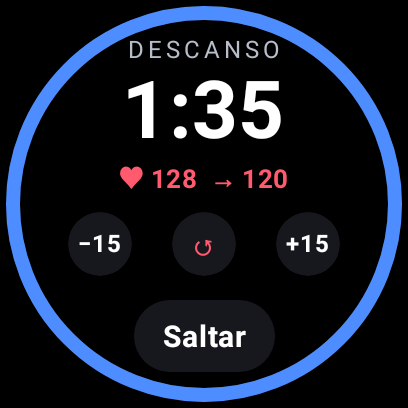
Automatic restTicking starts the countdown (01:30 by default); adjust it with ±15 s.
Your progressionRaise one set’s weight and the app remembers it for next time.

Back Squat Your PR: 100 kg

Coach’s whiteboard

70/5 75/3x2 80/2

How to read the whiteboard

70/55 reps at 70% of your PR.
75/3x22 sets of 3 reps at 75%.
Exact kilosRounded down to 2.5 kg, like on the bar.
Powered by AI

A coach that reads, calculates and talks to you

The AI does the boring work so you just lift.

From whiteboard to plan

Snap the whiteboard and the workout is built. If something’s hard to read, it asks you.

Back SquatMedium confidence
70/5 7S/3 80/2
Is it this?75/3Another

🧠 Coach evaluation

Your coach, in their voice

Customize it in any language: pick a voice or create your own, from a strict drill sergeant to the most upbeat one.

BookerFitness ·

A coach that knows you

Tell it how you train and what you lift. It suggests routines, weights per set and challenges for the week.

    AI is optional: switch it off in one tap and use the app manually, 100% privacy-focused.MCP ✓API · soon

    Your watch, connected

    What your watch records reaches BookerFitness by itself. And on Wear OS, it's right on your wrist.

    Health Connect, no extra apps

    On Android, the app reads your workouts, heart rate, calories and sleep straight from Health Connect. No Health Sync or anything else: your watch's app just needs to share its data with Health Connect.

    Works with the apps from

    • Samsung Health Galaxy Watch · Galaxy Fit
    • Google Pixel Watch · Fitbit
    • Garmin Connect
    • Zepp Amazfit
    • Mi Fitness Xiaomi · Redmi
    • Oura
    • Whoop
    • Withings

    🍎 On iPhone (Apple Health) it comes with the native app, very soon.

    App for Wear OS watches Beta

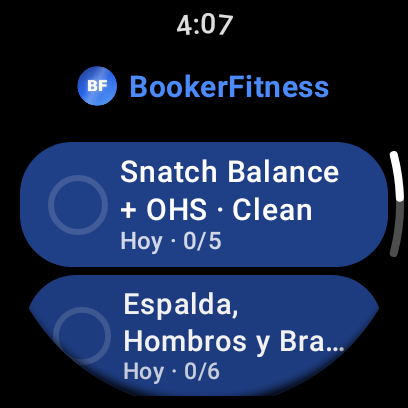
    Galaxy Watch, Pixel Watch and other Wear OS watches: train without taking out your phone.
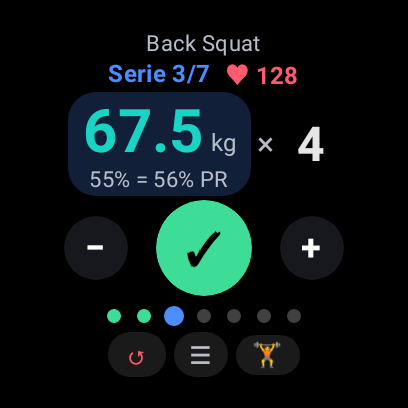
    • Open today's workout and check off every set from your wrist.
    • Adjust the weight by turning the bezel or crown.
    • Rest timer with vibration, plus a heads-up when your heart rate is back down.
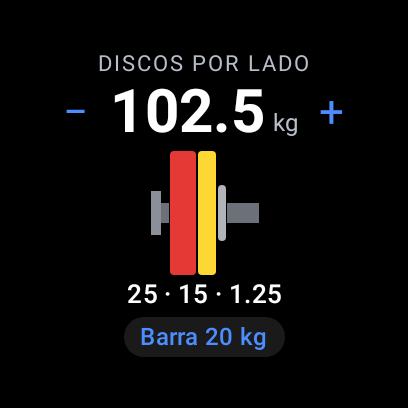
    • Plate calculator: what to load on each side of the bar.
    • Live heart rate and your coach's notes on your wrist.

    Your data, safe

    Everything travels encrypted and you decide what to share. Download or delete your data anytime.

    • Encrypted
    • No ads
    • Easy to use
    • Optional AI
    Read the privacy policy →

    Join the beta

    BookerFitness is in private beta. Leave your name and email and we’ll send you an invite as soon as a spot opens.

    Which phone do you have?

    We store your name and email encrypted, only to send you the invite. We delete them when you create your account or whenever you ask. We never share them. Privacy policy

    🤖 Android Coming soon · beta

    The app with Health Connect and notifications is in closed beta. With your invite you can already use it in the browser.

    🍎 iPhone Coming soon

    The iPhone app comes later. With your invite you can use it from Safari and add it to your home screen.

    Ready for your next set

    Sign in, open today's workout and let the app do the math.

    For now it’s invite-only. Request an invite

    Terms of use

    Last updated: October 20, 2026

    1. Acceptance

    By creating an account or using BookerFitness you accept these terms. If you don't agree, don't use the service. BookerFitness is operated by VMNET.

    2. Your account

    You're responsible for keeping your password safe and for what happens on your account. Use truthful information and don't share access.

    3. Acceptable use

    Don't use the service for illegal activity, to try to access other people's accounts, or to upload content that isn't yours or that is offensive or harmful.

    4. Your content

    The photos, videos and notes you upload remain yours. You allow us to store and process them only to provide the service.

    5. Health and exercise

    BookerFitness is a tool to log and organize your training. Suggestions and reviews, including AI-generated ones, are not medical advice and don't replace a professional. Check with your doctor before starting or changing an exercise program, and train within your limits.

    6. Availability

    We do our best to keep the service available, but there may be outages, changes or errors. Don't rely on the app as the only copy of important data.

    7. Limitation of liability

    To the extent permitted by law, BookerFitness is provided "as is" and is not liable for injuries, data loss or indirect damages arising from its use.

    8. Termination

    You can ask us to delete your account at any time. We may suspend accounts that break these terms.

    9. Governing law

    These terms are governed by the laws of Chile. Any dispute will be heard by the courts of Santiago.

    10. Contact

    privacy@tecnovm64.com